

Sistemas de aspiração de pó para CNC
Compare os sistemas de extração de pó CNC da TwoTrees, concebidos para capturar aparas e pó junto à área de corte. Escolha entre o kit de aspiração compacto Monster M1 e o coletor de pó de chão Monster M2. Verifique a compatibilidade com o spindle, a ligação à sapata de extração, o encaminhamento da mangueira, os requisitos de espaço de trabalho e as necessidades de manutenção antes de selecionar um sistema.
-
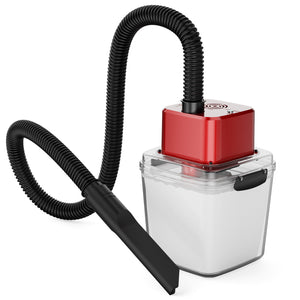

Kit Aspirador CNC Twotrees Monstro (M1)
Preço normal €115,99Preço normal -
Economize €119,00
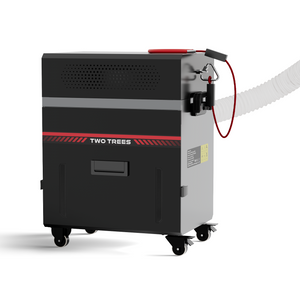
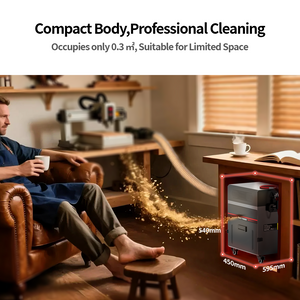
Kit Aspirador CNC Twotrees Monster (M2)
Preço normal €425,95Preço normal€544,95-€119,00 Preço de saldo €425,95 -
Economize €245,00


【Pré-venda】Coletor de pó Twotrees M3 para ED1
Preço normal €453,95Preço normal€698,95-€245,00 Preço de saldo €453,95


Know More
How to Choose a CNC Dust Collection System
A CNC dust collection system captures chips and dust close to the cutting area before debris spreads across the machine and workshop. The right setup depends on the CNC configuration, spindle or router motor, dust shoe, connection interface, hose routing, material and available floor space. This collection contains dedicated TwoTrees CNC vacuum cleaners rather than general CNC accessories or complete machine bundles.
Browse CNC router accessories for other upgrade types, or visit the CNC router collection if you need a complete machine. Product compatibility must be confirmed before selecting a dust collector.
1. Compare TwoTrees CNC Dust Collection Systems
| Product | Design | Highlighted features | Important compatibility note |
|---|---|---|---|
| Monster M1 Kit | Compact CNC vacuum cleaner | Brushless motor, manual or automatic start/stop and built-in LED work light | Compatible with supported 775 and 500W spindle setups. It is currently not compatible with the 800W or 1000W spindle setups. |
| Monster M2 Kit | Floor-standing, wheeled metal dust collector | Pull-out collection/filter cartridge, centrifugal fan and interchangeable connection interface | Confirm the machine, dust shoe, hose/interface and planned material with the current product documentation before ordering. |
| Dust Collector M3 | Dedicated dust collector for the ED1 CNC router | Purpose-built collection option for the ED1 platform | Designed for ED1. Do not assume compatibility with other CNC platforms; confirm the current package and pre-sale information before ordering. |
Product specifications, included parts and compatibility can change. The individual product page and installation documentation are the final sources for the selected configuration.
2. Start with Machine and Spindle Compatibility
A dust collector is only useful when its capture components fit the cutting system. Check the spindle or router-motor shape, dust-shoe mounting method, hose interface and Z-axis clearance. A product that connects to one spindle setup should not be assumed to fit another. The Monster M1 is compatible with supported 775 and 500W spindle setups, but it is currently not compatible with 800W or 1000W spindle setups. The M3 is designed specifically for the ED1 platform.
3. Choose the Right Size and Workflow
The compact M1 is designed to integrate closely with a supported 775 or 500W spindle setup and offers manual or automatic operation. The M2 uses a larger wheeled cabinet with a pull-out cartridge, making it a different dust-management format for workshops that can accommodate a floor-standing collector. The M3 is the dedicated collection option for the ED1. Measure the space around the machine and plan a hose route that will not restrict axis movement.
4. Capture Dust Close to the Cutter
Effective CNC router dust collection begins at the cutting area. Position the compatible dust shoe correctly and keep the hose as direct as the installation allows. Sharp bends, leaks, a blocked brush skirt or a poorly fitted interface can reduce collection performance. Confirm clearance through the full machine travel before starting a job.
5. Match the System to the Material
Wood, MDF and similar materials can generate a mixture of larger chips and fine dust. Collection requirements can differ for plastics, composites and metals. Do not collect hot chips, sparks, liquids or combustible material unless the selected equipment is expressly rated for that use. A CNC vacuum cleaner does not replace appropriate ventilation or personal protective equipment.
6. Maintain Airflow and Operate Safely
Inspect the hose, dust shoe, collection compartment and filter before use. Empty and clean the system according to the product instructions rather than waiting for airflow to fall noticeably. Disconnect power before maintenance, keep cables and hoses clear of moving components, and never leave a CNC router or dust collector unattended while operating.
Frequently Asked Questions
What does a CNC dust collector do?
A CNC dust collector draws chips and dust away from the cutting area through a compatible dust shoe and hose. It can help keep the work area and machine cleaner, but performance depends on fit, airflow, hose routing, maintenance and material.
What is the difference between the Monster M1, M2 and M3?
The M1 is a compact CNC vacuum cleaner for supported 775 and 500W spindle setups, with manual or automatic operation, a brushless motor and an LED work light. The M2 is a larger floor-standing metal collector with wheels and a pull-out collection/filter cartridge. The M3 is designed specifically for the ED1 CNC router. Verify the selected machine connection and included components before ordering.
Which spindle setups are compatible with the Monster M1?
The Monster M1 is compatible with supported TwoTrees 775 and 500W spindle setups. It is currently not compatible with the 800W or 1000W spindle setups. Check the exact spindle, dust-shoe connection and machine configuration before ordering.
Will a CNC vacuum cleaner capture all airborne dust?
No dust collector should be assumed to capture every particle. Collection depends on the dust shoe, hose, airflow, material and maintenance. Use suitable ventilation and personal protective equipment, and follow the material and machine safety guidance.
Why do dust-shoe fit and hose routing matter?
The dust shoe needs to capture debris close to the cutter without contacting the tool, clamps or workpiece. Leaks, blockage, sharp hose bends or a hose that pulls against the moving axes can reduce collection and create a safety risk. Test the complete travel range before machining.
How often should a CNC dust collector be cleaned?
Follow the maintenance interval in the product instructions and inspect the collection compartment, filter, hose and dust shoe before use. Empty or clean the system before it becomes overfilled or airflow is restricted. Disconnect power before maintenance.
Can a CNC dust collector be used for every material?
No. Material dust and chips have different hazards. Do not collect hot chips, sparks, liquids or combustible material unless the equipment is expressly rated for that use. Check the collector, CNC machine and material safety instructions before machining.


