

Fresadoras CNC de 4 ejes
Explora los paquetes de routers CNC de 4 ejes de TwoTrees equipados con módulos rotativos para grabado cilíndrico y determinados proyectos sobre superficies curvas. Compara las configuraciones actuales TTC450 Pro, TTC450 Ultra y TTC6050, con diferentes opciones de husillo, fresa y gestión del polvo. Todas las máquinas de esta colección incluyen explícitamente un cuarto eje; se excluyen las máquinas estándar de tres ejes y los accesorios rotativos independientes.
-
Ahorra €251,95


Máquina CNC Router Twotrees TTC450 PRO + Módulo Láser TC20 + Motor 500W + Módulo de 4º Eje + Aspiradora + Fresas de Extremo
Precio habitual A partir de €1.157,00Precio habitual€1.408,95-€251,95 Precio de oferta A partir de €1.157,00 -
Ahorra €351,00

 New
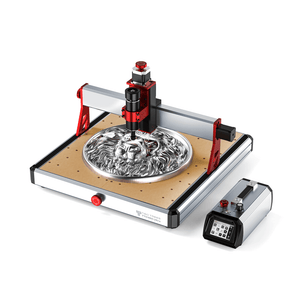
NewMáquina CNC Router Ultra Twotrees TTC450+ 4º Eje + Aspiradora M1
Precio habitual €815,95Precio habitual€1.166,95-€351,00 Precio de oferta €815,95 -
Ahorra €181,00
 New
NewMáquina CNC Router Ultra Twotrees TTC450+ 4º Eje + Aspirador M1 + Fresas
Precio habitual €929,95Precio habitual€1.110,95-€181,00 Precio de oferta €929,95 -
Ahorra €390,00


Máquina CNC Router Twotrees TTC6050
Precio habitual €1.691,95Precio habitual€2.081,95-€390,00 Precio de oferta €1.691,95 -
Ahorra €154,00
 New
NewMáquina CNC Router Ultra Twotrees TTC450+ Husillo de 800 W + 4º eje
Precio habitual €876,95Precio habitual€1.030,95-€154,00 Precio de oferta €876,95 -
Ahorra €299,00
 New
NewMáquina CNC Router Ultra Twotrees TTC450 + 4º Eje + Fresas de extremo
Precio habitual €839,95Precio habitual€1.138,95-€299,00 Precio de oferta €839,95 -


Fresadora CNC Twotrees TTC450 PRO + Husillo de 500 W + 4.º eje
Precio habitual €677,00Precio habitual -
Ahorra €154,00
 New
NewMáquina CNC Router Ultra Twotrees TTC450+ Módulo láser TC20 + 4º eje
Precio habitual €1.111,95Precio habitual€1.265,95-€154,00 Precio de oferta €1.111,95 -
Ahorra €417,00

Máquina CNC Router Twotrees TTC6050
Precio habitual €1.655,95Precio habitual€2.072,95-€417,00 Precio de oferta €1.655,95 -

Máquina CNC Router Twotrees TTC450 PRO + Motor 500W + Módulo de 4º Eje + Aspiradora + Fresas de extremo
Precio habitual €809,00Precio habitual -


Fresadora CNC Twotrees TTC450 PRO + Aspiradora M1 + 4.º eje
Precio habitual €650,00Precio habitual -

Fresadora CNC Twotrees TTC450 PRO + Aspiradora M1 + 4.º eje + Fresas de extremo
Precio habitual €697,00Precio habitual -

Fresadora CNC Twotrees TTC450 PRO + 4.º eje + Fresas de extremo
Precio habitual €611,00Precio habitual -

Máquina CNC Router Twotrees TTC450 PRO + Módulo Láser TC20 + Motor de 500w + Eje CNC Rotatorio 4º + Fresas
Precio habitual €1.140,00Precio habitual -
Ahorra €384,00
 New
NewMáquina CNC Router Ultra Twotrees TTC450
Precio habitual €926,95Precio habitual€1.310,95-€384,00 Precio de oferta €926,95 -

Máquina CNC Router Twotrees TTC450 PRO + Motor 500w + Eje 4 CNC Rotatorio + Fresas
Precio habitual €723,00Precio habitual


Know More
How to Choose a 4 Axis CNC Router
A 4 axis CNC router adds a rotary axis to the familiar X, Y and Z movement of a three-axis machine. The rotary axis holds and turns a compatible workpiece so the cutting tool can reach multiple sides without repeatedly removing and manually repositioning the material. This makes a CNC router with a rotary axis useful for cylindrical engraving and detailed work around compatible curved surfaces.
This collection is limited to current TwoTrees machine bundles whose product titles and package configurations explicitly include a fourth-axis module. It does not include ordinary three-axis machines, standalone rotary accessories or discontinued base models. Browse the complete CNC router collection for standard machines and other configurations.
1. Understand What the Fourth Axis Does
On a standard CNC router, the cutting tool moves along three linear axes. A fourth-axis setup introduces rotary movement, usually identified as the A-axis. The workpiece is secured in the rotary fixture and rotated to present a new side or surface to the cutter.
Actual rotary capability depends on the controller, firmware, CAM software, post-processor and selected machine bundle. Verify that the complete setup supports the intended rotary toolpath before planning a specific project.
2. Compare TwoTrees 4-Axis CNC Platforms
| Machine family | Base working range | Typical bundle options | Best suited to |
|---|---|---|---|
| TTC450 Pro + 4th Axis | 460 × 460 × 80 mm | Fourth axis with end mills, spindle or dust-management options | General rotary engraving and first 4-axis workshop projects |
| TTC450 Ultra + 4th Axis | 460 × 460 × 100 mm | Fourth axis with end mills, 800W spindle, vacuum or other selected accessories | More demanding rotary projects and users seeking an upgraded platform |
| TTC6050 + 4th Axis | 600 × 500 × 100 mm | Fourth-axis configurations with an 800W spindle or vacuum cleaner | Larger flat workpieces combined with rotary-axis capability |
The listed linear working ranges describe the base machines, not the maximum rotary workpiece size. Rotary capacity depends on the chuck, center height, fixture, stock shape and safe clearance. Confirm every included component and compatibility detail on the individual product page before ordering.
3. Projects Suited to a CNC Rotary Axis
A fourth axis is useful when the workpiece needs controlled rotation during the machining process. Suitable projects depend on the rotary fixture, material, cutter and available clearance.
- Cylindrical engraving: text, patterns and relief designs around compatible round stock.
- Rotary relief carving: create compatible raised or recessed patterns around curved stock.
- Decorative columns and handles: create repeated patterns along a supported cylindrical workpiece.
- Small sculptures and models: access more sides of a part with fewer manual setups.
- Custom components: produce compatible knobs, legs, grips and other rotational forms.
A rotary axis does not make every object or material suitable for machining. Irregular stock, weak clamping, excessive length or insufficient clearance can create unsafe conditions and inaccurate results.
4. Check CAM Software and Toolpath Support
Four-axis projects require a toolpath that understands rotary movement. Confirm that the selected CAM software can generate the rotary operation you intend to use and that the post-processor matches the controller. Standard three-axis G-code should not be assumed to provide rotary control automatically.
Before machining the final part, verify the axis direction, rotation units, origin, tool clearance and travel limits. A dry run above the workpiece can help identify incorrect rotation or potential collisions before the cutter contacts the material.
5. Prioritize Workholding and Rotary Safety
The workpiece must be centered and securely held by the compatible chuck and support system. Check that the cutter, collet, rotary fixture and material are secure, and keep clamps, cables and hoses away from moving components. Use suitable eye and hearing protection, control dust and never leave the machine unattended while it is operating.
Choose the bundle by its actual included components rather than the product image alone. Similar-looking products may include different spindles, end mills, vacuum cleaners or laser modules. Only a listing that explicitly includes the fourth axis belongs in this collection. If the required cutting tool is not included, compare compatible CNC router bits and end mills by cutter type, shank size, material and planned rotary operation.
Frequently Asked Questions
What is a 4 axis CNC router?
A 4 axis CNC router combines three linear axes with a rotary axis that holds and turns a compatible workpiece. It can reduce manual repositioning and support cylindrical engraving and selected projects around compatible curved surfaces.
What projects can I make with a CNC rotary axis?
Depending on workholding and clearance, a rotary axis can be used for cylindrical engraving, patterns around round stock, rotary relief carving, decorative columns, compatible handles, knobs and small sculptural forms.
Which TwoTrees machines are available with a fourth axis?
Current fourth-axis bundles are available around the TTC450 Pro, TTC450 Ultra and TTC6050 platforms. Included spindles, end mills, vacuum cleaners, cooling components and laser modules vary by listing, so confirm the complete package on the individual product page.
What is the difference between 4-axis and 5-axis CNC?
A four-axis setup adds one rotary axis to three linear axes. A five-axis machine adds another rotational direction, allowing access from more angles. Five-axis capability should not be assumed from a machine simply because it includes a fourth-axis rotary module.
What software is required for 4-axis CNC machining?
The CAM software must generate the rotary toolpath required by the project, and the post-processor must match the machine controller. Verify compatibility for the selected model instead of assuming that standard three-axis software automatically supports rotary movement.
How should a rotary workpiece be secured safely?
Center and secure the workpiece with the compatible chuck and support system, verify tool and fixture clearance, and keep cables and hoses away from moving parts. Use suitable eye and hearing protection, control dust, perform a safe dry run and never leave the CNC router unattended while it is operating.


